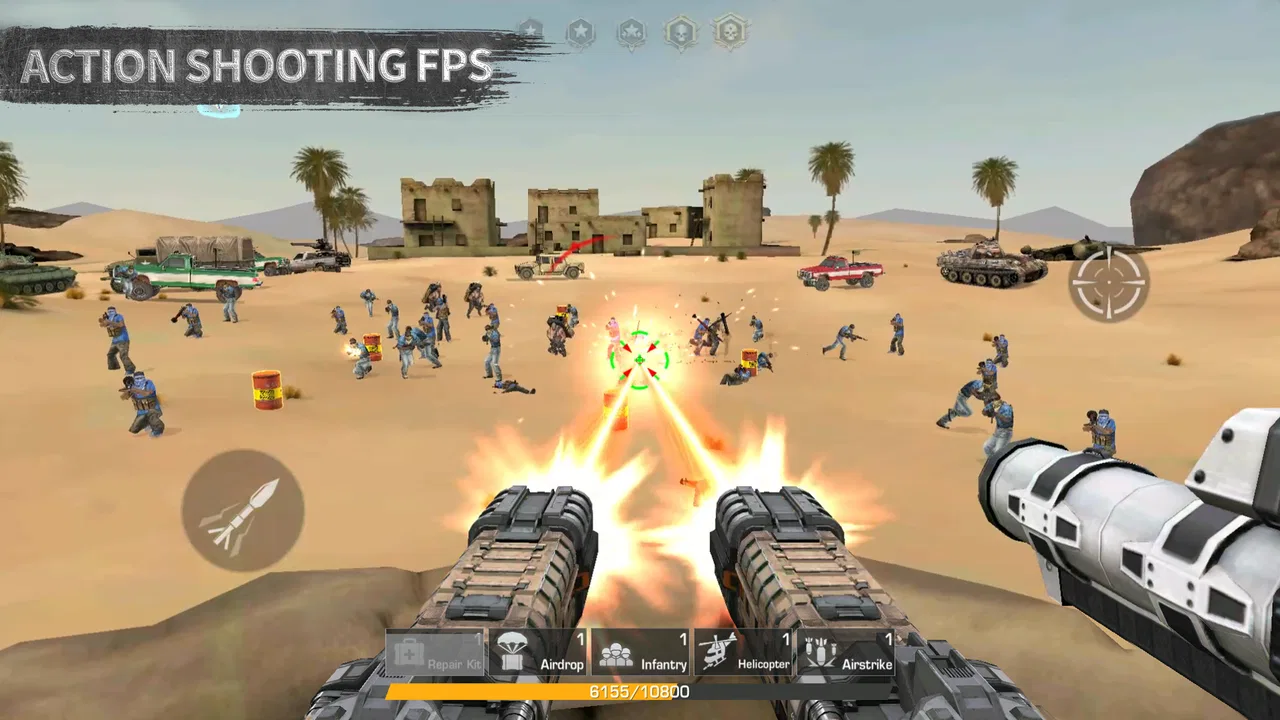
War Zone: Fight For Homeland
- 4.4
- Rating
- 10.00M
- Installs
- Free
- Price

 Analysis by App-foxy
War Zone: Fight For Homeland is the kind of action game I open when I want a quick shooting session without committing to a large, complicated production. Developed by Horus Entertainment, it presents itself as a first-person shooter that works both online and offline. That combination is the main reason I gave it time: it offers a way to play when connected, but it is also aimed at moments when a reliable connection is not available.
My overall impression is mixed in a useful way. The game is easy to understand at a basic level, and its free entry makes it simple to try. At the same time, players expecting the depth, polish, and consistency of a major console-style shooter may find the experience more limited. I see it as a lightweight action option for Android users who want shooting gameplay on demand, rather than as a complete replacement for the biggest names in the genre.
What the first sessions are really like
The first thing I would tell a new player is not to judge the game only by its store summary. The important question is whether its simple approach fits your habits. If you enjoy picking up a game, learning the controls quickly, and getting into action without studying a long progression system, War Zone: Fight For Homeland has an appealing starting point. If you need finely tuned competitive balance or a large amount of content, you should keep your expectations under control.
You May Also Like

 Blood Strike: 2.5 Anniversary
Blood Strike’s Loadouts Turn Every Drop Into a Tactical Gamble
A close look at Blood Strike’s custom loadouts: how fast access to signature weapons reshapes its battle royale rhythm, rewards preparation, and narrows the gap between fights.

 Pandora - Music & Podcasts
Pandora’s Music Is Easy to Start, but Harder to Recover
Pandora’s strength is its low-effort path from a seed to a station. Its weak spot is how much confidence it asks you to place in connection, setup, and quiet recovery.

 8 Ball Pool
 Is Built on Rivalries, Rematches, and Routine
A close look at the rivalries, rematches, shared routines, and unanswered safety questions that turn a quick pool match into a persistent mobile community.

 Samsung Music
’s Quiet Strength Is Playing What You Already Own
Its reach comes less from spectacle than from dependable access to a personal library. That simplicity is both the app’s strongest retention engine and its ceiling.

 AccuWeather: Weather Radar
AccuWeather Review: A Quick, Clear Forecast for Everyday Decisions
For everyday plans, the best forecast is the one you can understand quickly. AccuWeather makes rain timing, radar, and local conditions easy to act on, with a few trade-offs.

 Hill Climb Racing
Why Hill Climb Racing Still Turns Crashes Into One More Run
A tiny car, a bumpy hill and one more upgrade: Hill Climb Racing keeps resurfacing because its simple chaos makes every near-miss feel personal.
More From Our News Desk



The game belongs to the action category and carries a Teen content rating. That makes it more suitable for older teenagers and adults than for young children, especially because the central activity is shooting. It is free to download, which lowers the risk of trying it, although optional in-app purchases range from $0.49 to $109.99 per item. I would treat those purchases carefully and decide in advance whether you want to spend anything at all.
Its audience is broad, but the strongest fit is someone who wants a straightforward mobile FPS for short breaks. I can imagine using it during a commute with no dependable signal, during a trip, or at home when I only have a few minutes. The offline option is especially practical because it removes one common barrier to casual play. Still, offline availability should not be confused with a full substitute for online competition; the two situations serve different purposes.
Where players can get stuck before the action begins
With a mobile shooter, the first obstacle is often not the shooting itself. It is getting the game into a comfortable state. A player may install it and immediately find that the controls feel unfamiliar, the display is not ideal, or the expected mode is not available in the way they assumed. I recommend treating the first launch as a setup session rather than rushing straight into a serious match.
Start by checking that the phone has enough free storage and that Android is compatible. The game supports Android 7.0 and later, so older devices may sit outside that range even if they can run other action games. Compatibility is only the first check, though. A phone that technically meets the operating-system requirement can still feel uncomfortable if its screen is small, its touch response is inconsistent, or too many other apps are active.
I also suggest closing demanding background apps before playing. This is not a special requirement of War Zone: Fight For Homeland; it is a sensible way to reduce avoidable interruptions in any touch-based shooter. If the device becomes warm or the game starts feeling less responsive, take a short break and try again after the phone has cooled. That simple habit can tell you whether the problem is the game or the device’s current workload.
Before relying on offline play, I would launch the game once while connected. This gives the installation a chance to complete its normal first-run preparation and lets you see whether the version on the phone opens correctly. After that, test offline mode deliberately by switching off the connection and starting a short session. Doing this before a journey is much better than discovering at the airport or on a train that your planned setup is not ready.
The current version is 0.0.5.5, and the game was released on October 24, 2022. Those details matter less than the practical lesson: keep the installed version current through the normal app store process when an update is offered. Updates can change stability or compatibility, and an older installation may behave differently from what other players describe. I would not assume that every online tip applies equally to every version.
Small setup choices that make mobile shooting less frustrating
Touch controls reward patience. Instead of trying to play at full speed immediately, I prefer using an early low-pressure session to learn how movement, aiming, and firing respond. The goal is not to win that first attempt. It is to discover whether the control layout matches the way I hold the phone. A grip that works for a large device may feel awkward on a smaller one, and changing how I hold the phone can be more useful than blaming the game.
Keep the screen clean and avoid playing with fingers that are wet, greasy, or covered by a thick glove. In a first-person shooter, a small missed swipe can feel like a serious software problem even when the real issue is touch contact. I also find it helpful to avoid charging in a way that makes the phone difficult to hold. A stable grip gives more consistent movement and makes it easier to separate control mistakes from performance problems.
Sound is another practical consideration. If you play in a public place, low volume may make it harder to notice what is happening around you, while high volume can be distracting. I would use headphones only when the surroundings are safe and quiet enough to allow attention to remain on the real world. The game is entertainment, not a reason to ignore traffic, travel announcements, or people nearby.
For younger players, the Teen rating should be part of the decision before installation. Parents may also want to discuss the presence of optional purchases. The free download makes testing easy, but the purchase range means it is sensible to use the device’s normal purchase protections and agree on spending limits. That is a better approach than assuming a free game cannot lead to paid transactions.
Recovering when a session does not go as planned
When the game fails to open, freezes, or behaves strangely, I would work through the simplest recovery steps first. Close it completely, reopen it, and check whether other apps are consuming the phone’s resources. If the problem appears only while connected, compare it with an offline attempt. If it appears in both situations, the connection is less likely to be the main cause.
A useful recovery workflow is to change one thing at a time. Restart the phone, try again, and observe the result. Then check for an available game update. If you change the network, clear several apps, alter device settings, and reinstall all at once, you lose the ability to identify what actually helped. A calm sequence produces more useful information and avoids unnecessary disruption.
Network problems deserve their own check because the game supports both online and offline play. If an online session fails to start, try a different stable connection when one is available, and avoid judging the whole game from a single weak signal. Busy public networks can create delays that feel like poor game performance. On the other hand, if offline play works normally while online play repeatedly struggles across reliable connections, the issue may be related to the online environment rather than your phone’s controls.
Reinstalling should be a later step, not the first one. It takes time and may remove local app data, so I would use it only after simpler checks have failed and only after considering whether anything important could be lost. The same caution applies to clearing app data through Android settings. Those actions can solve a damaged installation, but they should not be used casually when a restart or update check may be enough.
If a problem remains, write down what happened in practical terms: whether it occurred online or offline, whether it happened immediately or after playing, and whether the phone was hot or low on storage. That description is much more useful than saying only that the game is broken. It also helps you notice patterns. A crash that appears after long sessions suggests a different line of investigation from a failure that happens on every launch.
When the game is not the real cause
It is easy to blame a mobile shooter for every missed shot or delayed response. I have learned to separate three different experiences: control error, device performance, and connection delay. They can feel similar, but the solutions are different. If movement reacts consistently yet my aim is poor, practice is the answer. If the whole phone feels sluggish, background load or heat deserves attention. If actions arrive late only online, the network becomes the stronger suspect.
Device age also changes the experience. War Zone: Fight For Homeland can be attractive to someone with a modest Android phone because the offline option makes it less dependent on constant connectivity. However, a modest phone may still struggle with any action game if storage is nearly full or many services are running. I would not use the minimum operating-system requirement as a promise of identical performance across every compatible device.
Connection quality is especially important when comparing this game with larger online shooters. A major competitive title may provide more sophisticated networking, broader matchmaking, and a larger player community, but it can also demand more storage, stronger hardware, and a steadier connection. War Zone: Fight For Homeland’s appeal is partly its lower-commitment format. That advantage matters most when convenience is more important than tournament-level precision.
There is also a difference between wanting action and wanting a long-term hobby. Someone who enjoys unlocking equipment, studying detailed maps, coordinating with a regular squad, and improving through a deep competitive ladder may outgrow this game. In that case, a more established multiplayer shooter is probably the better choice, even if it requires more space and a stronger device. Choosing the right game depends on what you want from each session, not simply on which title is free.
Practical ways to decide whether it belongs on your phone
I would recommend trying it in three situations before forming a final opinion. First, play a short connected session to see whether the basic controls feel natural. Second, repeat the test offline, because that is one of the game’s most useful practical distinctions. Third, return to it after a day or two and ask whether you still enjoy the shooting itself without needing a purchase or a large social group to make the experience worthwhile.
This three-part test reveals more than a quick first impression. The connected session shows how comfortable you are with the game’s general flow. The offline session shows whether it works as a dependable travel or backup game. The return visit tests lasting appeal. If the game feels enjoyable only when everything is new, it may be better as an occasional distraction than as your main action title.
Players should also decide how they feel about optional spending before they begin. Because the game is free but includes items priced from $0.49 to $109.99, I would avoid making purchases simply to solve early frustration. Learn the controls first and see whether the core experience is enough. If the game is not enjoyable without spending, paying more is unlikely to fix the underlying mismatch.
The game has attracted a sizable audience, with an average rating of 4.4 from around 61 thousand ratings and more than 10 million installs. Those figures suggest that many people find the basic idea appealing, but they do not guarantee that it will suit every device or play style. I read popularity as a reason to try it, not as proof that its limitations will not matter to me.
Its review volume also shows that the game has generated ongoing player feedback, with around 1.3 thousand written reviews. I would still treat individual comments carefully. A complaint about connection, controls, or performance may describe a particular phone or network rather than a universal flaw. Looking for repeated patterns is more sensible than letting one enthusiastic or angry opinion decide the installation.
My verdict after weighing convenience against depth
War Zone: Fight For Homeland succeeds most clearly as a convenient, free action FPS with online and offline play. That combination gives it a practical role that many players overlook. It can fill a short break, provide something to do without a connection, and offer a simple way into mobile shooting without requiring an immediate purchase. For a casual player with a compatible Android phone, those are meaningful strengths.
Its weaknesses are tied to the same simplicity. I would not choose it first for serious competitive play, extensive long-term progression, or the most refined mobile shooter experience. Players who want a large ecosystem and highly polished online systems should look at established alternatives in the genre. They may demand more from the phone and the connection, but they are better suited to people who treat an FPS as a primary hobby.
For everyone else, the sensible approach is to install it with modest expectations, test both play modes, and spend time on setup before deciding whether the controls work for you. Keep the phone in good condition, distinguish connection trouble from device trouble, and do not use purchases as a substitute for enjoying the basic game. The best reason to keep this game installed is its flexibility, not the promise of unlimited depth.
My final recommendation is therefore cautious but positive. I would suggest it to someone asking me for a free shooting game that can remain useful away from a dependable connection. I would skip it for a player seeking a highly competitive flagship FPS or a richly developed multiplayer community. As a lightweight option from Horus Entertainment, it earns a place on the shortlist, provided you judge it by the practical experience it offers rather than by expectations borrowed from much larger games.
FAQs for War Zone: Fight For Homeland
01What is War Zone: Fight For Homeland?
War Zone: Fight For Homeland is an action-oriented combat game focused on military battles, defensive missions, and strategic firefights. Players typically move through hostile environments, complete objectives, and confront waves of enemy forces while using different weapons and equipment. The game is designed for users who enjoy fast-paced shooting gameplay combined with mission-based progression and a war-themed atmosphere.
02How does the gameplay work in War Zone: Fight For Homeland?
The gameplay centers on completing combat missions, eliminating opponents, surviving attacks, and advancing through increasingly difficult stages. Before downloading, players should expect a combination of aiming, movement, weapon selection, and tactical positioning. Some missions may require more than simply shooting, since choosing cover, managing ammunition, and reacting quickly to enemy attacks can make a noticeable difference during tougher encounters.
03Can War Zone: Fight For Homeland be played offline?
Offline availability can depend on the version of the game and the specific mode being used. Campaign-style missions may be playable without a constant connection, while advertisements, online features, updates, leaderboards, or certain rewards may require internet access. It is best to check the game’s store description and test the main modes after installation, especially if you plan to play while traveling or with limited mobile data.
04Is War Zone: Fight For Homeland free to download and play?
The game may be available as a free download, but free access does not always mean that every feature is completely unrestricted. Players should look for advertising, optional in-app purchases, premium weapons, upgrade systems, or other paid items that could affect progression or convenience. Reviewing the store listing and the purchase settings on your device is recommended before allowing children or other users to play.
05What devices are compatible with War Zone: Fight For Homeland?
Compatibility depends on the operating system, device model, available storage, and the minimum software requirements specified by the developer. Because action games can require considerable graphics and processing power, older phones or tablets may experience slower performance, longer loading times, or reduced visual quality. Before downloading, check the official Android or iOS listing for supported versions and ensure that enough free storage is available for installation and updates.
Pros
- Fast-paced combat keeps matches engaging.
- Multiple weapons allow flexible playstyles.
- Team battles add a strong cooperative element.
- Compact matches suit short gaming sessions.
- Progression rewards regular play and experimentation.
Cons
- Frequent firefights can feel repetitive over time.
- Some weapons may require extensive upgrading.
- Online play depends heavily on a stable connection.
- Touch controls can feel crowded on smaller screens.
- Battery usage may increase during longer sessions.

War Zone: Fight For Homeland
Gallery